
Introduction
Chaos engineering is a common practice for testing the resilience of your Kubernetes cluster by introducing controlled failures. KubeDOOM takes chaos engineering to the next level by integrating Kubernetes pod termination with the classic game DOOM. By Deploying KubeDOOM for Chaos Engineering in Kubernetes, you can simulate actual failures in a fun way. This guide walks through the process of setting up KubeDOOM for testing your cluster resiliency.
Prerequisites
Before proceeding with the installation, ensure that you have the following:
- A running Kubernetes cluster (Minikube, Kind, or a self hosted Kubernetes service like in our guide How to Deploy Kubernetes Using Kubespray).
- kubectl configured to interact with your cluster.
Deploying KubeDOOM
Step 1: Clone the Repository
Start by cloning the KubeDOOM repository to access its Helm charts and deployment scripts:
$ git clone https://github.com/storax/kubedoom.git
$ cd kubedoom
Step 2: Deploy KubeDOOM on Kind Kubernetes
Use kubectl to apply the required manifests:
$ kubectl apply -f manifest/namespace.yaml
$ kubectl apply -f manifest/deployment.yaml
$ kubectl apply -f manifest/rbac.yaml
This will create the necessary deployments and configurations for KubeDOOM.
Step 3: Verify the Deployment
Check if all required pods are running:
$ kubectl get pods -n kubedoomYou should see a running pod for the KubeDOOM controller.
$ kubectl get pods
NAME                            READY   STATUS    RESTARTS   AGE
kubedoom-59f54d5965-56hfc       1/1     Running   0          10m
Step 4: Expose KubeDOOM
Create the Service
apiVersion: v1
kind: Service
metadata:
  name: kubedoom
  namespace: kubedoom
spec:
  selector:
    app: kubedoom
  ports:
    - protocol: TCP
      port: 5900
      targetPort: 5900
  type: ClusterIP
Apply the yaml:
$ kubectl create -f service.yamlCreate the port-forward
Create the port-forward where your kubectl command is running in order to connect to the doom VNC.
$ kubectl port-forward -n kubedoom --address 0.0.0.0 svc/kubedoom 5900:5900Connect
Connect to the VNC using your favorite VNC tool (I’m using Remmina):
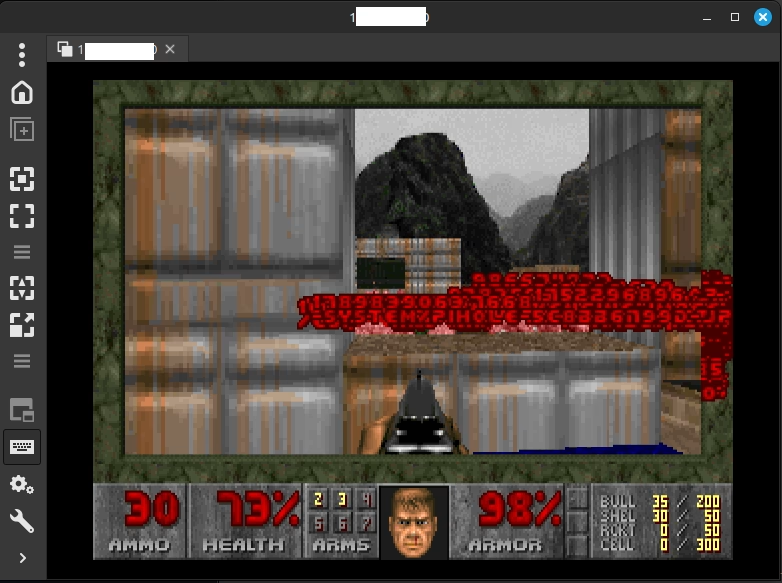
Once connected, start playing DOOM and terminate Kubernetes pods by eliminating enemies inside the game!
Step 5 – LOAD (Optional)
In order to create some load on the cluster, i’ve also created a busybox deployment to provide a lot of pods that you can test this with. Here’s the deployment:
apiVersion: apps/v1
kind: Deployment
metadata:
  name: k8s-co-il-load
  namespace: kubedoom
spec:
  replicas: 10
  selector:
    matchLabels:
      app: kubedoom-test
  template:
    metadata:
      labels:
        app: kubedoom-test
    spec:
      containers:
      - name: busybox
        image: busybox
        command: ["sh", "-c", "sleep infinity"]
        resources:
          requests:
            cpu: "10m"
            memory: "5Mi"
          limits:
            cpu: "20m"
            memory: "10Mi"
After creating the deployment you should see the pods in the cluster:
$ kubectl get pods
NAME                              READY   STATUS    RESTARTS   AGE
k8s-co-il-load-58975865b8-2wxcp   1/1     Running   0          46s
k8s-co-il-load-58975865b8-54r5q   1/1     Running   0          46s
k8s-co-il-load-58975865b8-62wtg   1/1     Running   0          46s
k8s-co-il-load-58975865b8-dxp86   1/1     Running   0          46s
k8s-co-il-load-58975865b8-fzbq7   1/1     Running   0          46s
k8s-co-il-load-58975865b8-glgs5   1/1     Running   0          46s
k8s-co-il-load-58975865b8-hpv95   1/1     Running   0          46s
k8s-co-il-load-58975865b8-plcr6   1/1     Running   0          46s
k8s-co-il-load-58975865b8-sx8vv   1/1     Running   0          46s
k8s-co-il-load-58975865b8-wqdb7   1/1     Running   0          46s
kubedoom-58fc4ff8d5-xx5rz         1/1     Running   0          9m40s
Now, let’s edit the doom play to only show us pods of kubedoom namespace:
            - name: NAMESPACE
              value: kubedoom
And now we can see in the courtyard, only kubedoom-test pods:
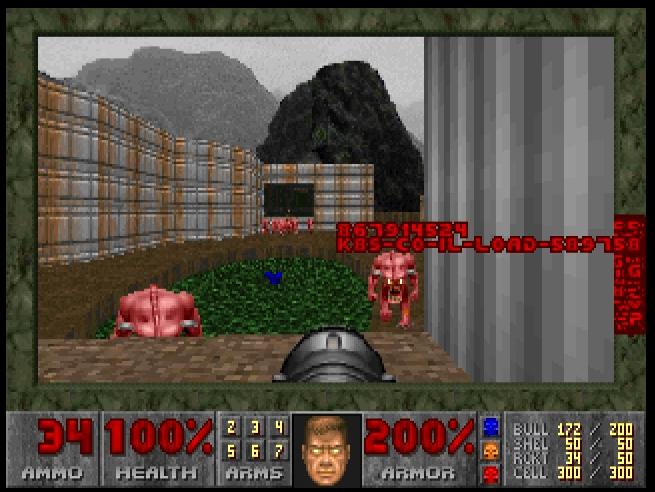
Feel free to kill the pods and see them dying on the namespace. I’ve ran watch -d -n1 "kubectl -n kubedoom get pods" and saw my pods getting killed after i shoot the monsters.
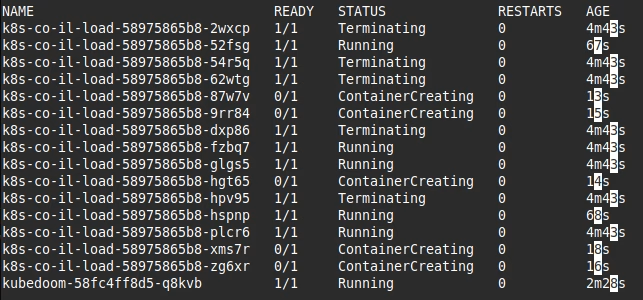
NOTE: if you need health and weapons you can use the cheat codes: IDDQD and IDKFA
Summary
KubeDOOM represents a fun way for chaos engineering by introducing gamification into infrastructure testing. By Deploying KubeDOOM for Chaos Engineering in Kubernetes, teams can safely and interactively simulate pod failures in their Kubernetes environment, gaining valuable insights into system resilience. This way helps organizations reinforce their Kubernetes reliability strategies in an innovative way. If you need assistance in implementing chaos engineering practices at scale, Octopus Computer Solutions can help you build resilient Kubernetes environments tailored to your business needs.
If you want to learn more about Chaos Engineer you can start at https://github.com/dastergon/awesome-chaos-engineering with their awesome list of tools and more.