
Introduction
Headlamp Web Dashboard with Helm is a practical way to give teams a browser-based Kubernetes UI without forcing everyone onto terminal-only tools like k9s. Headlamp runs in-cluster and is consumed over HTTP(S), which fits well for shared operations workstations, jump hosts, and “read-only” NOC-style access. This is also a good complement to platforms that already ship a strong web console (like OpenShift), where Headlamp can serve as a lightweight, upstream Kubernetes UI for non-OpenShift clusters. The official Headlamp docs explicitly describe in-cluster deployment plus exposing it via an ingress.
Why use Headlamp vs k9s and other CLIs
Web-first access: Headlamp is designed as a Kubernetes web UI, so access is through a browser and an ingress/service, not a local terminal session.
Comparing to Kubernetes Dashboard (and Kubespray): The Kubernetes Dashboard is also a web UI, and Kubespray can deploy it when dashboard_enabled: true is set in the addons configuration. See Deploying a Fully Offline Kubernetes Cluster with Kubespray
Operational sharing: You can publish a single internal URL instead of distributing kubeconfigs and expecting everyone to maintain local tooling.
Comparing to OpenShift Console: OpenShift’s web console is a mature “day-2” experience (monitoring views, admin/developer perspectives, etc.). If you want to manage mixed fleets (OpenShift + upstream Kubernetes), Headlamp helps standardize a web UI experience across environments.
Procedure
Prerequisites
- A working Kubernetes cluster with Helm v3
- An Ingress Controller deployed (nginx-ingress / HAProxy Ingress / Contour, etc.)
Deploy Headlamp Web Dashboard with Helm
Add the helm repo:
$ helm repo add headlamp https://kubernetes-sigs.github.io/headlamp/
$ helm repo update
Deploy to a dedicated namespace:
$ kubectl create namespace headlamp-system
$ helm install my-headlamp headlamp/headlamp --namespace headlamp-system
Add Ingress
Following is a clean, generic ingress you can apply (adjust host, ingress class, and TLS secret).
apiVersion: networking.k8s.io/v1
kind: Ingress
metadata:
  name: headlamp
  namespace: headlamp-system
  annotations:
    # Pick ONE depending on your controller:
    # kubernetes.io/ingress.class: "nginx"
    # or, prefer ingressClassName below (newer clusters)
    nginx.ingress.kubernetes.io/proxy-body-size: "10m"
spec:
  ingressClassName: nginx
  # or ingressClassName: cilium if you use cilium
  rules:
    - host: headlamp.k8s.co.il
      http:
        paths:
          - path: /
            pathType: Prefix
            backend:
              service:
                name: headlamp
                port:
                  number: 80
  # Optional TLS
  # tls:
  #   - hosts:
  #       - headlamp.example.internal
  #     secretName: headlamp-tls
Apply it:
$ kubectl apply -f headlamp-ingress.yamlQuick verification
$ kubectl -n headlamp-system get deploy,svc,ingress | grep -i headlamp
$ kubectl -n headlamp-system describe ingress headlamp
For example here’s an output of one of our clusters with Cilium:
deployment.apps/my-headlamp   1/1     1            1           18h
service/my-headlamp   ClusterIP   10.43.74.218   <none>        80/TCP    18h
ingress.networking.k8s.io/headlamp-ingress   cilium   headlamp.k8s.co.il   10.0.0.20   80      18h

Name:             headlamp-ingress
Labels:           <none>
Namespace:        headlamp-system
Address:          10.0.0.20
Ingress Class:    cilium
Default backend:  <default>
Rules:
  Host                  Path  Backends
  ----                  ----  --------
  headlamp.k8s.co.il
                        /   my-headlamp:80 (10.42.1.8:4466)
Annotations:            <none>
Events:                 <none>
Access and RBAC basics for Headlamp Web Dashboard
By default, Headlamp uses a ServiceAccount in its namespace and builds a kubeconfig from it. If you want safe adoption, start with read-only RBAC and expand only when needed.
For the purpose of accessing for this tutorial. Let’s see how to configure temporary access.
Create a Service Account token
Let’s create a service account:
$ kubectl -n headlamp-system create serviceaccount headlamp-adminGive admin rights to the account
$ kubectl create clusterrolebinding headlamp-admin --serviceaccount=headlamp-system:headlamp-admin --clusterrole=cluster-adminCreate the token:
$ kubectl create token headlamp-admin -n headlamp-systemAccess using the token
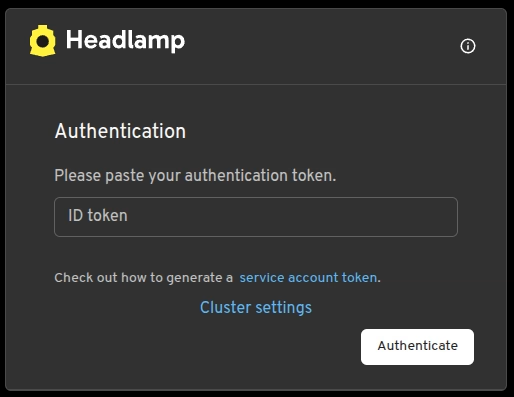
You can now use this token to access the Web Console. Navigate to http://headlamp.k8s.co.il and enter your token:
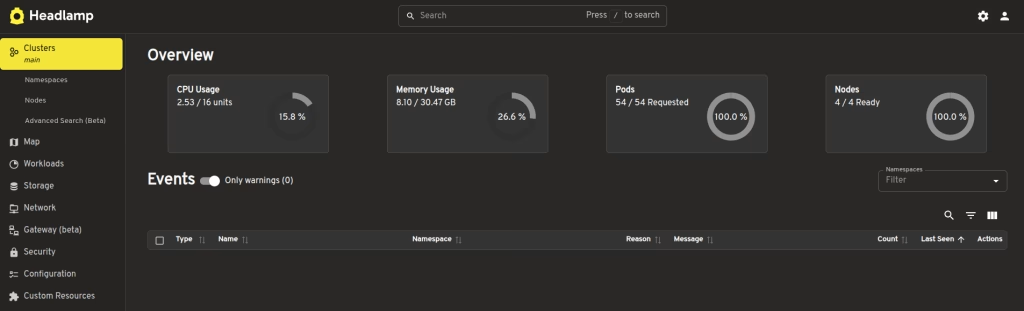
After you login you should see the following page.
Summary
Headlamp Web Dashboard with Helm gives you a browser-based Kubernetes UI that’s easier to standardize for teams than terminal tools. It’s a pragmatic companion to environments where OpenShift already delivers a rich web console, and it can also be an upgrade path from the default Kubernetes Dashboard that Kubespray can enable. Make sure for production that you are exposing Headlamp safely via an ingress and aligning access to RBAC or OIDC. At Octopus Computer Solutions, we typically help customers with production environments and their requirement for operational roles, integrate authentication cleanly, and keep cluster troubleshooting workflows consistent, often across mixed Kubernetes and OpenShift fleets.